

Introduction
Introduction
Most creators use AI the wrong way: they open a chatbot, type 'write me a post,' get something generic, and decide AI does not work for them. The problem is not the tool. It is the use case.
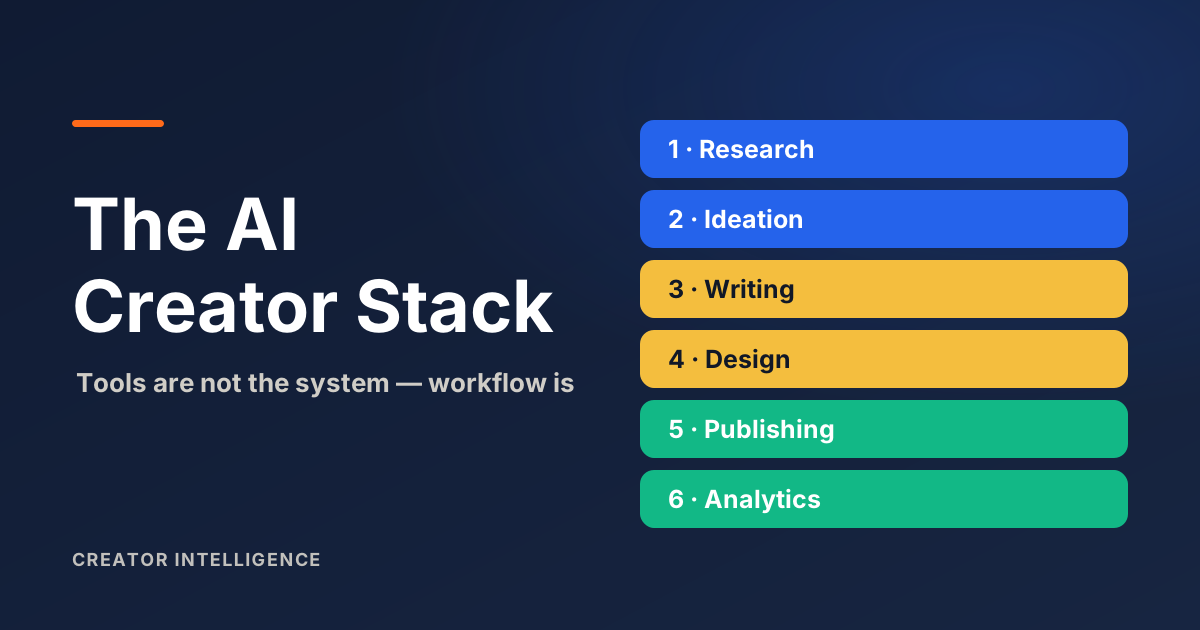
Here is the truth: tools are not the system. Workflow is. The creators getting real leverage from AI did not find a magic app — they built a repeatable process and put AI inside it.
This guide explains what an AI creator stack really is, the six workflow layers it covers, and how to build a simple version that keeps your judgment in the loop.
What Is an AI Creator Stack?
An AI creator stack is the combination of tools a creator uses across their full content workflow — research, ideation, writing, design, publishing, and analytics — where each tool covers a specific layer. It is a system, not a single app.
The word stack matters. One tool used alone is a feature. A set of tools that work together across your whole process is a stack. For most solo creators, the effective stack is two to four tools — not twenty.
Here is the rule: if your stack has more apps than your workflow has steps, you bought tools you do not use.
Why Solo Creators Need Workflow Before Tools
You do not have a tools problem. You have a workflow problem. AI made content cheap to produce — until everyone has the same advantage.
Academic research on AI-driven creator monetization points to this tension: AI workflows create real opportunity, but they also flood the market with sameness and raise hard questions about authenticity. When the supply of 'fine' content explodes, the scarce thing becomes a real point of view and a process you can repeat.
The creator economy is large — now estimated in the hundreds of billions of dollars — and professionalizing, with brands investing through measurable partnerships (IAB). Coverage of the creator economy is blunt about the bar: creators have to show value beyond impressions. Generic AI output works against that, so start with the workflow and let the tools come second.
Layer 1: Research and Trend Discovery
This is where AI earns its keep first. Use it to summarize sources, surface the questions your audience is actually asking, and turn messy notes into an outline.
What AI cannot do: know your audience's specific context or verify what is true. Use AI to gather and structure — then you verify, add real experience, and frame it for your people.
Layer 2: Ideation and Prompt Generation
Most 'bad AI output' is really a bad prompt. Vague in, vague out. The fix is structured prompting: give the model a role, your niche, your audience, the format, and the constraints.
That single change separates generic results from useful ones. The Creator Prompt Generator is built for exactly this — it turns your creator context into copy-ready prompts so you are not starting from a blank box.
Layer 3: Writing and Editing
The workflow that works: you outline, AI drafts, you edit. The outline keeps your thinking in the structure. The edit puts your voice, examples, and judgment back in.
AI editing tools help with clarity and grammar as a final pass. They do not replace reading your own work — especially on a topic where you have real expertise.
Layer 4: Design and Media Creation
AI can speed up thumbnails, simple graphics, captions for images, and first-draft visuals. Treat it like a fast junior designer: great for volume and variations, supervised by your taste.
Keep your visual identity consistent. A recognizable look builds trust faster than any single viral image.
Layer 5: Publishing and Repurposing
This is where solo creators win the most time. One core piece — a long video, a newsletter, a deep post — becomes threads, shorts, captions, and email with AI assistance.
The rule: produce once at depth, then repurpose with AI. Expect to edit the repurposed versions — AI tends to keep long-form rhythm where short-form needs its own.
Layer 6: Analytics and Feedback
The least-used, highest-value layer. Paste your top and bottom performers into a model and ask what the winners have in common. Summarize comment themes to plan next month.
A creator system without a feedback layer cannot learn. Thirty minutes of structured review beats hours of guessing.
Starter Stack vs Advanced Operating Stack
You do not need the advanced stack to start. You need one layer working. Start with one tool for your worst bottleneck, and add a second layer only after the first is stable.
A simple starter stack vs an advanced operating stack, by layer.
| Layer | Starter Stack | Advanced Stack | Best for |
|---|---|---|---|
| Research | AI summaries from notes | AI research + question mining | Sharper angles |
| Ideation | One prompt template | Prompt library per platform | On-brand ideas |
| Writing | Outline, draft, edit | Draft + clarity + voice check | Speed with voice |
| Design | AI graphic drafts | Brand templates + AI variations | Visual identity |
| Publishing | Repurpose one core piece | AI multi-format set | Presence, no burnout |
| Analytics | Monthly AI review | Tagged feedback loop | Compounding learning |
Common Mistakes Creators Make With AI
Buying tools before fixing the workflow — a faster broken process is still broken.
Publishing AI drafts unedited — generic, unsourced content erodes the trust you need.
Chasing every new app — two stable tools beat ten half-used ones.
Skipping analytics — if you never review, you never improve.
Outsourcing judgment — AI supports the layers; your taste and audience reading stay human.
I have watched creators add five tools in a month and publish less. The tools were not the bottleneck. The missing workflow was.