

Introduction
Introduction
Every creator has a handful of answers they give on repeat. The same question in the DMs. The same 'how do I price this?' under every other video. The same back-and-forth before someone finally gets it. Each time, you spend energy, and the answer disappears into one more thread nobody else will ever see.
Opal, an experimental tool from Google Labs, is interesting precisely because it can turn one of those repeated answers into something a person can use without you. You describe the logic in plain language, and Opal assembles an editable workflow — input, reasoning, output — into a shareable mini-app, no code involved. This guide does not list features. It walks one real question from idea to working prototype, so you can see where a mini-app belongs in a creator business, and where it does not.
Start with the answer you are tired of giving
The strongest Opal idea is almost never the most creative one. It is the most repetitive one. Look for the explanation you give so often that you could recite it in your sleep: how to choose a first offer, how to read a sponsorship rate, how to know if an idea is worth filming. Frequency is the whole signal. If you have explained something twenty times by hand, you have already done the market research.
A repeated answer becomes a candidate for a mini-app when it has a clear shape: one kind of person asking, one or two pieces of information they can give you, and one useful thing they want back. If you cannot say who it is for, what they put in, and what they get out in a single sentence, the idea is not ready yet. Sharpen the sentence before you ever open the tool — that is where most of the real work lives.
A mini-app is a product, not another post
A post is consumed once. Someone reads it, maybe saves it, and moves on. A small tool behaves differently: it gets reused, it gets shared because it solved a problem rather than described one, and — crucially — it reports back. Every time someone runs it, you learn what they actually entered and what they hoped to get. That is feedback you cannot get from a view count.
This is why thinking in mini-apps quietly changes how you treat your audience's questions. Instead of 'another thing to answer,' a recurring question becomes 'a utility I could prototype this week.' You are not committing to building software. You are committing to testing whether a problem is real and repeated enough to deserve a permanent place in your business.
Build-along: one pricing question, start to finish
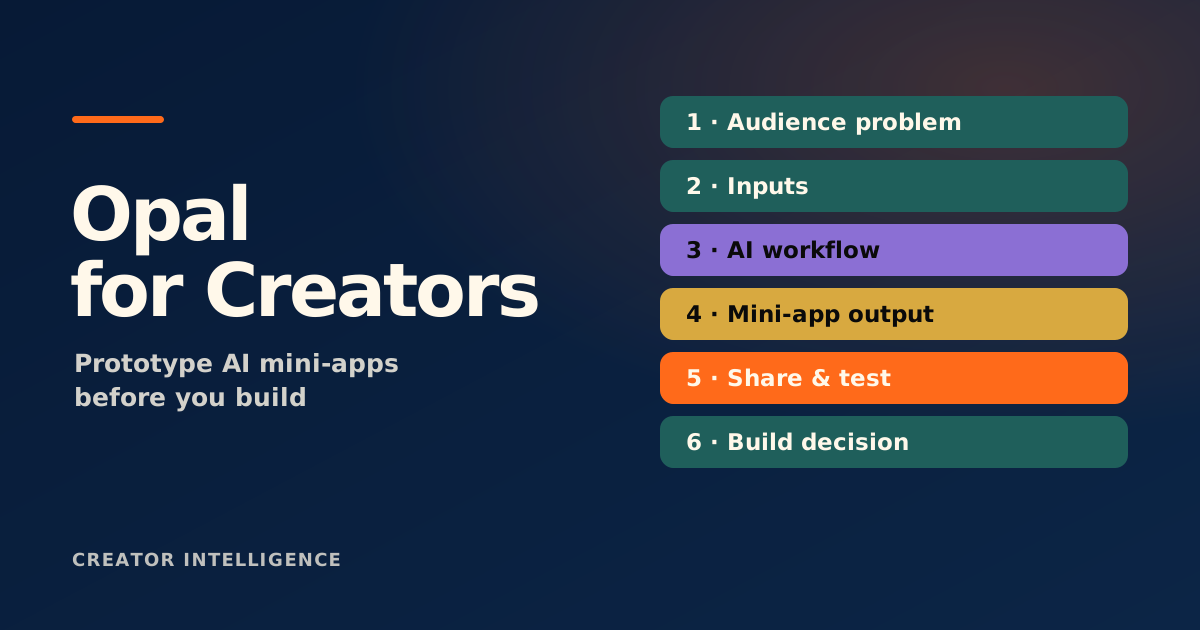
Here is a concrete walk-through using a question many creators field constantly: 'How should I price my first digital product?' Rather than answering it again in a DM, you turn it into a small guided tool. Each stage below maps to a step you can describe to Opal in plain language.
'I have an audience but no idea what to charge for my first product.' You have answered this dozens of times, always with the same handful of follow-up questions.
Instead of asking for everything, you ask for three things: what the product is, who it is for, and roughly how engaged the audience is. That is enough to give a useful starting range.
The app returns a suggested price range, the single biggest factor pushing it up or down, and one sentence on how to test the price — not a guaranteed number, but a structured starting point.
Before sharing, you run it on five real scenarios from your own audience and read the outputs critically. If the advice is generic or wrong on edge cases, you tighten the instructions until it holds.
You share the link as a lightweight lead tool: 'Not sure what to charge? Try this.' Now the question answers itself, and you can see how many people actually use it.
Where a no-code mini-app belongs in your business
A mini-app is most valuable at the edges of your funnel. Near the top, it works as a lead tool: a quiz, a checker, or a calculator that helps a stranger get one quick win and gives you a reason to follow up. Further down, it works as a qualifier — a tool that helps someone decide whether your offer fits before they buy, which protects both your time and their money.
It also pairs naturally with the rest of a creator system. Use the Creator Prompt Generator to structure the underlying prompt before you build, so the logic is clear. Use a landing-page prototype to test the surface around it. Connect whatever you learn back to audience, offer, and revenue with the Creator System Toolkit. The mini-app is rarely the destination; it is a fast, low-cost probe that tells you where to invest next.
Limits, privacy, and the human checkpoint
Opal is labelled experimental for a reason, and that should shape how far you trust it. Its availability, models, and features can shift, so anything you build is better treated as a prototype than a dependency. Test outputs across several real inputs rather than one flattering example, because a tool that works on your best-case scenario can still mislead someone whose situation is messier.
Privacy deserves a hard line. A mini-app that asks for sensitive information is a liability, not a feature — collect the minimum you need, and remember that sharing an app can also expose the prompts behind it. And no tool decides your positioning. Whether the output is accurate, on-brand, and genuinely helpful is a judgment only you can make before anything reaches your audience.
Treat any Opal build as a prototype: confirm the output holds across several real inputs, collect the least sensitive data possible, and review accuracy and positioning yourself before sharing. Google Labs features and availability can change — check the official product page for current details.