

Introduction
Introduction
Many creators collect feedback without using it. They see comments, likes, saves, email replies, search terms, and analytics, but the next content decision still comes from instinct alone. Instinct matters, but it becomes stronger when it is supported by a clear feedback loop.
A creator feedback loop is the operating system between audience response and future content. It helps you notice what people are trying to understand, where they get stuck, which formats help them act, and what objections need a clearer answer.
This guide explains how to build that loop in a practical way, so audience signals become better content decisions instead of more noise.
What Is a Creator Feedback Loop?
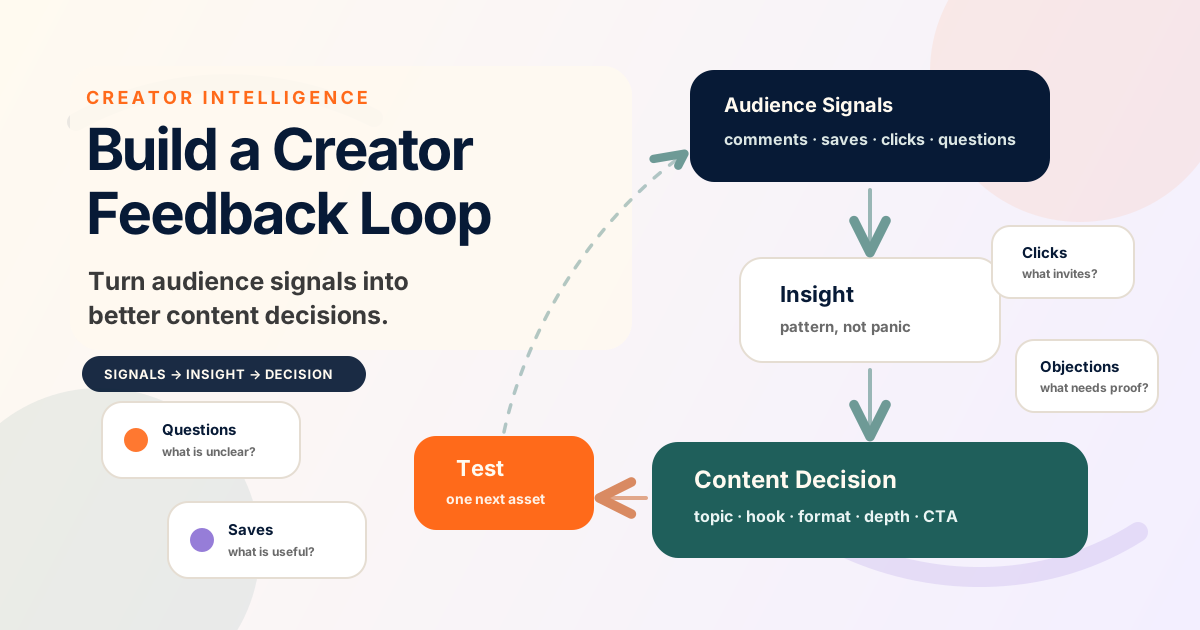
A creator feedback loop is a repeatable process for turning audience response into better content decisions. The loop is simple: publish, collect signals, interpret the signals, decide what to change, test the change, and review the next response.
The key word is decision. A metric is useful only when it helps you decide what to make clearer, deeper, shorter, more practical, more visual, or more specific. Without a decision step, creators can spend hours looking at analytics without improving the system.
A feedback loop does not mean obeying every comment or chasing whichever post performed best last week. It means using audience response as evidence while keeping your strategic judgment intact.
Why Feedback Loops Beat Guessing
Guessing creates random content calendars. A creator feels pressure to post, chooses a topic quickly, publishes it, and moves on without learning much from the response. The next post starts from the same uncertainty.
A feedback loop changes that pattern. Each content cycle produces information the creator can use. A saved carousel may reveal a practical pain point. A low-click headline may reveal unclear framing. A repeated question may reveal the need for a beginner guide. A thoughtful objection may reveal the next essay.
Over time, the creator is no longer just making more content. They are building a better map of the audience's needs, language, confusion, and readiness.
Practical rule: do not ask, 'Did this post win?' Ask, 'What should this response teach us to improve next?'
The Five-Part Feedback Loop
Use this five-part loop to make feedback operational instead of emotional or random.
A practical creator feedback loop for turning audience signals into content decisions.
| Stage | Question | Output |
|---|---|---|
| 1. Publish | What idea, format, and promise are we testing? | A specific post, guide, email, video, or thread. |
| 2. Collect signals | What did the audience do, ask, save, click, or challenge? | A short list of observable signals. |
| 3. Interpret | What might this signal mean, and what else could explain it? | A grounded insight, not a rushed conclusion. |
| 4. Decide | What content decision should change next? | A topic, angle, hook, format, example, depth, or CTA decision. |
| 5. Test | What small follow-up will validate the decision? | A focused next asset or content experiment. |
Step 1: Define What You Are Trying to Learn
Before publishing, write down what the asset is supposed to teach you. This keeps the feedback loop focused. A post can test whether an audience understands a concept, cares about a problem, prefers a format, needs a deeper example, or is ready for a tool or offer.
For example, a guide about content systems might test whether creators are more confused by planning, repurposing, analytics, or monetization. Each response tells you something different about the next useful piece of content.
Name the content decision you are testing.
Write the audience question the asset should answer.
Decide which signal would indicate confusion, interest, or readiness.
Avoid testing five things in one asset if you want clear learning.
Step 2: Collect Signals From More Than One Place
Audience signals rarely live in one dashboard. Creators should combine platform analytics with qualitative signals from comments, replies, DMs, search queries, email responses, community questions, and sales-page behavior where relevant.
A save might show practical usefulness. A reply might show emotional resonance. A click might show curiosity. A question might show missing context. An objection might show the next clarification your audience needs before they trust the idea.
Common audience signals and what they may suggest.
| Signal | Possible meaning | Possible content decision |
|---|---|---|
| Repeated questions | The explanation is useful but incomplete. | Create a beginner guide, FAQ, or clearer example. |
| High saves | The audience sees future utility. | Turn the idea into a checklist, template, or tool CTA. |
| Low clicks | The promise or headline may not be clear enough. | Test a sharper hook or more concrete benefit. |
| Thoughtful objections | The audience is engaged but not convinced. | Write a nuance post or comparison guide. |
| Short replies | The idea resonates but may not invite depth. | Ask a more specific question or add a stronger prompt. |
Step 3: Separate Signal From Noise
Not every response deserves a content change. One loud comment can be useful, but it can also be an outlier. A strong feedback loop protects creators from overreacting by looking for patterns across signals.
Before changing direction, ask whether the signal matches your target audience, whether it appears more than once, whether it connects to your strategic goals, and whether another explanation is possible. A low-performing post may have a weak hook, poor timing, unclear topic, or simply a smaller audience fit.
Interpretation is where creator judgment matters. The signal gives evidence, but the creator decides what the evidence should mean inside the broader system.
Do not let the easiest metric become the only metric. Saves, clicks, comments, questions, and objections each reveal different kinds of learning.
Step 4: Turn Signals Into Content Decisions
A useful feedback loop ends with a content decision. The decision should be specific enough that a creator can act on it during the next planning session.
Instead of writing, 'people liked this topic,' write, 'turn the audience's repeated question about tracking feedback into a practical decision-log template.' Instead of writing, 'thread did well,' write, 'test this same framework as a carousel because saves were higher than replies.'
Topic decision: what should we cover next?
Angle decision: what claim or frame should lead?
Format decision: should this become a blog post, carousel, short video, email, or tool?
Depth decision: should the next asset be beginner, tactical, advanced, or comparative?
CTA decision: should the audience read, reply, save, use a tool, subscribe, or share?
Step 5: Keep a Simple Decision Log
The feedback loop becomes much stronger when creators keep a short decision log. This does not need to be complex. A simple weekly note can capture the asset, signal, interpretation, decision, follow-up test, and result.
The value of a decision log is memory. Without it, teams repeat old debates and forget why a content direction changed. With it, the creator system develops a record of audience learning over time.
A simple creator feedback decision log.
| Field | Example |
|---|---|
| Asset | Blog guide about content repurposing. |
| Signal | Readers saved framework posts and asked how to choose the next idea. |
| Interpretation | The audience understands repurposing but needs a decision system. |
| Decision | Create a guide on building a creator feedback loop. |
| Follow-up test | Publish a checklist-style post and watch saves, replies, and tool clicks. |
How AI Can Help Without Replacing Judgment
AI can help summarize comments, cluster questions, extract repeated objections, draft follow-up angles, and turn a decision log into a content brief. This is useful when the creator has more signals than time.
But AI should not be the final judge of what matters. Audience response has context: brand positioning, target segment, platform behavior, timing, business goals, and creator voice. Use AI to organize the raw material, then use human judgment to decide what deserves a content change.
Ask AI to group audience questions by theme.
Ask AI to separate tactical questions from strategic objections.
Ask AI to draft three possible follow-up angles from a signal list.
Review every suggestion against brand tone, audience fit, and business priority.
A Weekly Creator Feedback Loop Workflow
A feedback loop works best when it is scheduled. A weekly review is usually enough for independent creators and small teams. The goal is not to measure everything. The goal is to make one or two better content decisions each week.
Choose three to five recent assets to review.
Collect quantitative signals such as saves, clicks, watch behavior, and email opens where relevant.
Collect qualitative signals such as comments, replies, questions, and objections.
Write one interpretation for each meaningful pattern.
Choose one follow-up content decision and one small test.
Review the test response in the next weekly loop.
Common Mistakes to Avoid
The first mistake is treating performance as identity. A weak post does not mean the creator is weak. It means the system has information to learn from. The second mistake is treating every signal equally. A comment from your target audience may matter more than a viral response from people you are not trying to serve.
The third mistake is changing too much at once. If you alter topic, hook, format, length, timing, and CTA in the same test, you will not know what improved the result. Keep follow-up tests small enough to learn from.
Do not chase vanity metrics without asking what they teach.
Do not let one platform's algorithm define your entire content strategy.
Do not ignore qualitative comments because they are harder to count.
Do not turn internal learning notes into public promises or guaranteed outcomes.