

Introduction
Introduction
Most creators use AI like a vending machine: they type 'give me 10 content ideas,' take whatever drops out, and wonder why it feels generic. The problem is not AI — it is that a one-off prompt has no system around it.
You do not need more random ideas. You need a system, and AI is the engine you run inside it.
This guide shows you how to turn one audience problem into a repeatable weekly content system using structured prompts — with a reusable framework, a day-by-day workflow, and a review loop that keeps improving.
Why Random AI Prompting Creates Random Content
Ask a model for 'content ideas' and it has to guess everything that matters: who you serve, what platform you are on, what you want the content to do. So it gives you the average of the internet — bland, broad, forgettable.
Structured prompting fixes this. When you tell the model your role, your audience, the platform, and the constraints, it stops guessing and starts working with your actual situation. Same model, completely different output.
A weekly system makes that structure automatic. Instead of reinventing a prompt every time you open the app, you run the same sequence each week, with prompts already shaped to your audience.
What a Weekly Content System Should Include
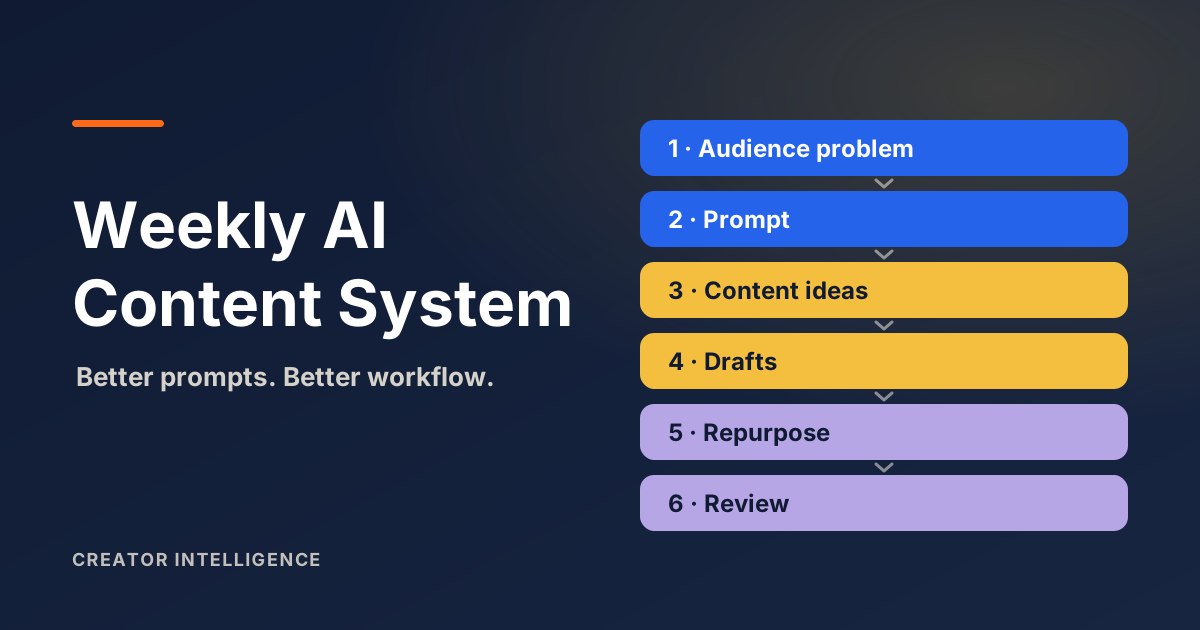
A content system is not a content calendar. A calendar tells you when to post; a system tells you how each piece gets made, from problem to published. A creator's weekly system has six moving parts.
A single audience problem to anchor the week.
Content pillars that connect that problem to your core topics.
Platform-specific ideas shaped for where you publish.
Drafts built from those ideas.
Repurposing that turns one core piece into several.
A review step that feeds next week.
AI can assist every part — but only if you prompt it with structure. That is what the rest of this guide builds.
Step 1: Choose One Audience Problem
Start with a problem, not a trend. Trends decay; problems repeat.
Pick one specific problem your audience has this week — ideally one you have been asked about — and prompt AI to understand it before you create anything. That gives you raw material grounded in a real problem, not a guess. Use a prompt like this:
Role: content strategist for a [niche] creator. Goal: understand one audience problem. Audience: [who they are]. Problem: [the problem]. Output: the top 5 questions this audience asks, and the 3 misconceptions they hold.
Step 2: Turn It Into Content Pillars
Pillars are the few recurring themes your content returns to; they keep a week coherent instead of scattered. Prompt AI to map the problem to pillars, then edit the angles so they sound like you:
Given this audience problem and top questions, propose 3 content pillars that connect it to my core topics: [your topics]. For each pillar, give a one-line angle that reflects my point of view.
Step 3: Generate Platform-Specific Ideas
One idea is not one piece. The same pillar plays differently on YouTube, Instagram, TikTok, and a blog, and a good prompt respects that. This is the kind of structured, platform-aware prompting the Creator Prompt Generator produces, so you are not writing the scaffolding by hand each week:
From pillar [X], generate ideas per platform: 3 YouTube titles (search-friendly), 3 Instagram carousel hooks, 3 TikTok openers (first 3 seconds), and 1 blog outline. Audience: [who]. Constraint: specific, no generic advice.
Step 4: Draft and Repurpose Content
Now you draft, and the biggest time win shows up: repurposing. Produce one core piece at depth, then let AI help you spin it into the rest. You outline, AI drafts, you edit — the edit is where your voice and judgment go back in, and expect to revise the short-form versions:
Here is my core piece: [paste]. Repurpose into: a 5-tweet thread, 1 Instagram caption with a hook and CTA, and a short-form script (under 150 words). Keep my voice; do not add claims I did not make.
Step 5: Review What Worked
This is the step most creators skip, and the one that compounds. Generation without review never improves. After reviewing, save what worked into a prompt library so next week starts ahead of this one:
Here are last week's top and bottom performers: [paste titles + metrics]. What do the top performers have in common? Give me 3 patterns to repeat and 2 to drop next week.
A Weekly AI Prompt Workflow Creators Can Reuse
Here is the whole system on a calendar. Adjust the days to your life — the sequence is what matters.
A reusable day-by-day weekly AI content workflow.
| Day | Focus |
|---|---|
| Monday | Research the audience problem |
| Tuesday | Generate 10 platform-specific ideas |
| Wednesday | Draft the long-form or core post |
| Thursday | Repurpose into short-form |
| Friday | Write captions and CTAs |
| Saturday | Review analytics and comments |
| Sunday | Update your prompt library |
Six focused steps, one per sitting. No blank pages, because every step starts from the last one's output.
Example Prompt Templates: The Nine-Part Framework
The reason these prompts work is structure. Use this nine-part framework for any content prompt, and keep filled-in versions in your library.
Role — who the AI should act as (for example, content strategist for a fitness creator).
Goal — what this prompt should accomplish.
Audience — who the content is for, specifically.
Platform — where it will be published.
Context — your niche, your angle, relevant details.
Constraints — length, tone, and what to avoid.
Output format — list, outline, script, or table.
Review criteria — how you will judge if it is good.
Next step — what you will do with the output.
A prompt that includes all nine parts rarely returns generic work, because there is almost nothing left for the model to guess.