

Introduction
Introduction
Let’s be real. You didn't come here because you want to read another generic guide about setting up Google Analytics.
You're here because you're tired of checking your view counts ten times a day, watching the numbers bounce up and down, and having absolutely no idea if your creator business is actually growing.
I get it. And I'm not going to judge you for it. But I AM going to tell you the truth: views and followers are vanity metrics. If you optimize your entire creative system for them, you will end up exhausted and broke. You need to focus on what actually moves the needle.
Why Views and Followers Are Not Enough
Most creators respond to a growth slowdown by checking their metrics. They open their dashboards. They look at the follower graph. They see a flat line, and they panic.
Here's the thing: a view is just a glance. A follower is just a handshake. Neither of them pays the bills.
Illustrative scenario: a video receives 250,000 views and produces 12 email signups with no recorded sales. Those invented numbers show why reach and business results should be measured separately; they are not the author's results or a benchmark. Attribution gaps and delayed purchases could also affect the interpretation.
Views can hide a broken system. If you have 50,000 subscribers but no email capture and no offer, you don't have a business — you have a platform-dependent hobby. If the platform changes its algorithm tomorrow, your hobby is gone.
The Four Layers of Creator Metrics
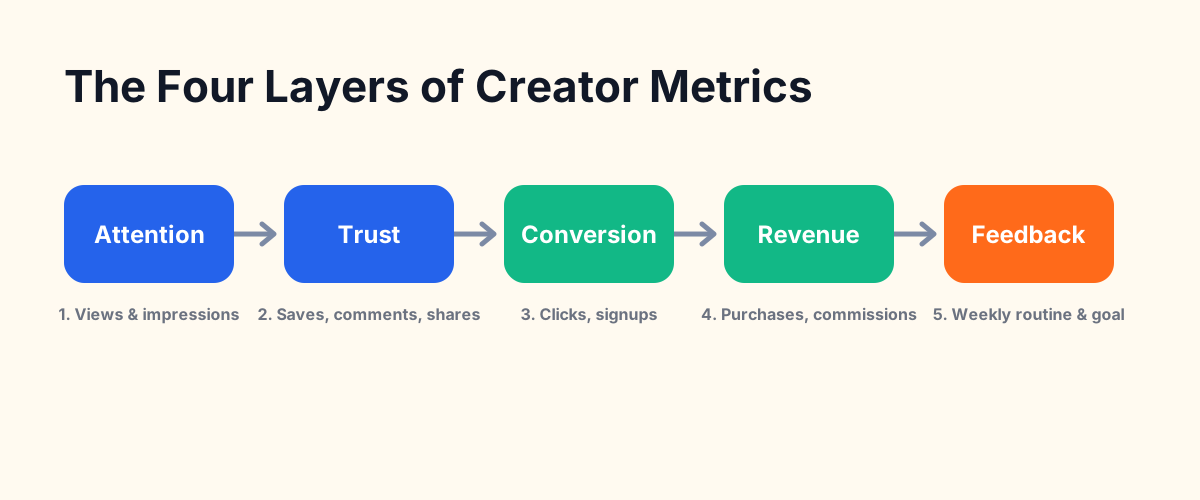
To build a real system, you must organize your metrics into four distinct layers: Attention, Trust, Conversion, and Revenue.
1. Attention Metrics
These show your reach and visibility. They are the top of your funnel: views, impressions, reach, click-through rate (CTR), and watch time or retention. These show how well you are attracting new eyes to your system.
2. Trust Signals
These show if your audience actually values your perspective. They reveal engagement and intent: saves, share ratio, comments, replies, and returning viewers. Return rate is one of the strongest trust signals, indicating that the content was valuable enough to bring a viewer back.
3. Conversion Signals
These measure how effectively you are moving attention off rented platforms and onto owned channels: click-throughs to CTAs, email opt-in rate, and quiz or tool starts.
4. Revenue Indicators
These show the financial health of your creator business: purchases, affiliate conversions, refund rate, and customer lifetime value. A high refund rate means your offer is failing to deliver.
Match Metrics to Content Goals
You can't track everything. You shouldn't try. The best metric depends entirely on the job of that specific content. If you write a post designed to attract new eyes, look at impressions and CTR. If you write a post designed to sell a product, focus on click-throughs and sales.
Aligning creator metrics with content goals.
| Metric Type | Examples | What It Tells You | What It Does Not Tell You | Next Action |
|---|---|---|---|---|
| Attention | Impressions, CTR, Views | How well you attract new eyes. | If the audience trusts you. | Improve hooks, headlines, or thumbnails. |
| Trust | Saves, Comments, Shares | If your content is genuinely useful. | If the audience is ready to buy. | Double down on top-performing topics. |
| Conversion | Email signups, link clicks | How well you capture attention. | If your paid offer is priced correctly. | Optimize your landing pages or lead magnets. |
| Revenue | Sales, commissions | The commercial fit of your offer. | If the buyers are happy long-term. | Test price points, upsells, or onboarding. |
| Feedback | Replies, refund rates | The overall health of the system. | Weekly algorithm changes. | Adjust the system based on actual patterns. |
How to Read Signals Without Overreacting
Most creators overreact to daily data. They see views drop on Tuesday and rewrite their entire content strategy on Wednesday. Don't do that.
Platform algorithms are volatile. They change constantly. If you react to every dip, you will drive yourself crazy.
Choose a review window that fits the decision and the amount of data. For CTR, compare similar traffic sources and wait for a meaningful sample; a calendar threshold alone does not make a result reliable. Fix broken links or factual errors promptly, while testing broader content changes over repeated observations.
The Weekly Creator Feedback Loop
A system only improves when you build a repeatable loop. You don't need a complex analytics dashboard. You need a 20-minute weekly review routine.
First, pick one goal for the week (e.g., increase email signups by 5%). Then, review your top-performing content, identify your strongest audience signals (such as repeated questions in comments or DMs), compare clicks and signups, find one pattern worth repeating, and choose one specific system improvement for next week.
Metrics by Platform and Content Type
Different platforms highlight different metrics. Learn what matters on your primary channel:
On YouTube, read CTR alongside traffic source, sample size, and retention. A lower CTR can accompany broader distribution. Use the retention curve to locate possible friction, then test a relevant change; a single metric does not identify the cause.
For newsletters, privacy features can inflate opens and distort click-to-open rates. Compare filtered clicks, replies, unsubscribes, and conversions instead of treating an open as proof of attention.
For blog posts, search traffic, engaged visits, scrolls, and useful next steps offer different clues. None proves content quality by itself; combine measurement with reader feedback.
What to Track If You Are Just Starting
If you are starting out, choose a small set of metrics tied to your next decision. List growth and returning readers can be useful, but a creator already making an offer should also track sales, costs, and customer feedback.
Track list growth and returning readers against your own baseline, then test whether an offer solves a problem people will pay to address. Audience growth alone does not establish demand, and slow list growth does not rule out a useful paid offer.
Common Analytics Mistakes
Checking stats daily: It wastes time and creates unnecessary anxiety. Weekly reviews are enough.
Ignoring the refund rate: If people buy but ask for their money back, your offer is broken.
Comparing yourself to larger creators: They have different systems, teams, and budgets. Focus on your own conversion rates.
Separating content from metrics: If you don't know what job a post was supposed to do, you can't measure its success.