

Introduction
Introduction
Let's be real. Most creators learned the first version of AI by asking a chatbot for outputs.
Write me a caption. Give me five hooks. Summarize this article. Make this sound better. That was useful, but it was not a system.
The next shift is bigger: AI agents for creators are moving the work from one-off prompts into repeatable workflows. Instead of asking for a single answer, you define a job, give the agent context, let it use approved tools, review what it did, and save the workflow for next time.
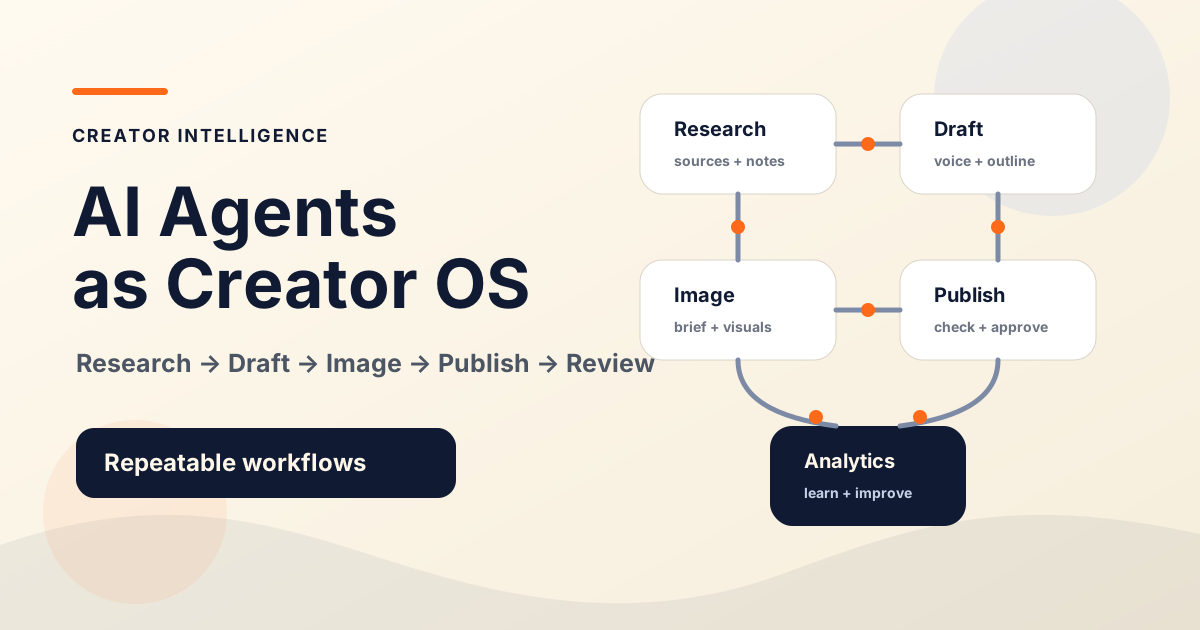
That is why AI agents are starting to look like the creator operating system. Not because they replace the creator. They do not. Because they help organize the work around the creator: research, planning, writing, image briefs, publishing checklists, analytics review, audience learning, and business operations.
Chatbots Respond. Agents Work Through a Job.
A chatbot answers the message in front of it. An agent works through a goal.
That difference sounds small until you see it in a real workflow. A chatbot can help you draft a newsletter intro. An agent-style workflow can gather source notes, outline the newsletter, draft it in your voice, create a subject-line test, check for unsupported claims, prepare a publishing checklist, and wait for approval before anything goes live.
Here is the rule: a chatbot gives you an output; an agent helps run a process.
LangChain's documentation describes agents as models combined with tools in a loop. Its human-in-the-loop documentation shows how selected actions can pause for review. Those technical building blocks help explain the creator workflow in this guide; using them does not guarantee that the model will complete a task correctly.
The agent needs a clear job.
The agent needs context.
The agent may need tools.
The agent needs boundaries.
The creator needs review checkpoints.
Without those pieces, an agent is just a confident assistant with too much room to make a mess.
Why Creators Should Care Now
The creator business is no longer just content.
It is research, positioning, publishing, offers, audience learning, repurposing, email, analytics, collaboration, customer questions, and small operational decisions that pile up every week.
That is exactly where agent workflows can help. Not by making every creative decision for you. That is the trap.
Agents become useful when they take a repeated pattern and help you run it with less friction. This is where the phrase creator operating system matters. An operating system does not do only one task. It coordinates tasks so the work can run in a repeatable way.
Research a topic before writing.
Turn one blog post into social posts.
Build a newsletter from audience questions.
Create a video outline from a long-form guide.
Prepare an image brief from an article.
Review analytics and identify follow-up ideas.
Check a draft for missing examples, claims, or weak calls to action.
Turn customer questions into better product education.
The Creator Operating System Model
A creator operating system is the structure behind your content and business.
It includes your topics, audience notes, offers, style rules, publishing standards, tools, checklists, metrics, and decision logs. AI agents become powerful when they plug into that structure instead of floating around as random chat windows.
Most creators skip the middle layers. They go from idea to prompt to output. Do not do that.
If the agent does not know your context, it will guess. If it has no boundaries, it may take the wrong action. If it has no review checkpoint, you become the cleanup crew.
A creator operating system gives AI agents context, boundaries, tools, and review checkpoints.
| Layer | What It Means | Creator Example |
|---|---|---|
| Context | What the agent should know | Audience, niche, offer, voice, past posts |
| Input | What starts the workflow | Topic, transcript, analytics export, reader question |
| Role | What job the agent owns | Researcher, draft reviewer, repurposer, checklist runner |
| Tools | What the agent may use | Browser, files, docs, CMS draft, analytics, automation app |
| Boundaries | What the agent cannot do | Publish, send, delete, price, promise, or change positioning |
| Review | Where the creator approves | Sources, outline, final draft, public claims, CTA |
| Playbook | What gets reused | Saved prompt, checklist, template, examples |
Practical Agent Workflows Creators Can Use
You do not need a massive AI setup to start.
Start with one workflow you already repeat. Then make the agent's job narrow enough that you can judge the output quickly.
Collect source notes, summarize what is reliable, flag weak claims, and list unanswered questions. Require source URLs and ban invented citations.
Turn a topic into a search-aware outline, reader promise, FAQ, and link plan. The agent can suggest structure, but the creator approves the angle.
Draft from approved notes, examples, and voice rules. Do not let the agent add statistics, quotes, or product claims that were not in the research file.
Turn an article into a visual brief for thumbnails, diagrams, and social cards. Keep text short, check mobile readability, and avoid generic AI imagery.
Transform one approved asset into platform-specific posts. Every version should preserve the original claim and avoid exaggeration.
Check title, slug, meta description, images, links, CTA, disclaimers, and share text. The agent can inspect and report; the creator approves launch.
Summarize performance patterns and suggest follow-up tests. Ask for possible explanations, not final conclusions.
What Current Agent Tools Teach Creators
The most visible agents today often come from software and workflow automation. That does not mean creators need to become developers. It means those tools reveal the pattern.
For software work, look for tools that expose changes as reviewable diffs and preserve the results of checks. The useful property is the evidence left behind, not the agent's confidence or brand name.
For repeatable operations, look for explicit triggers, limited tool access, saved state, and a way to pause before consequential actions. LangChain's documented review controls provide one technical example; other products implement these controls differently.
For a current product example, OpenAI introduced ChatGPT Work in July 2026 to gather information across apps and files and produce finished materials. Product names and access can change, so consult the linked announcement and current product documentation before committing to a tool.
Do not turn this into a tool-shopping spree. The better question is not, 'Which agent is hottest right now?' The better question is, 'Which repeated workflow in my creator business is clear enough to delegate safely?'
Named tools are examples of categories, not rankings, endorsements, or one-size-fits-all recommendations.
What to Check Before Choosing an Agent Tool
Before you connect an agent to your content, files, browser, analytics, or business tools, slow down.
Autonomy is not automatically better. Sometimes it is just faster risk.
Here is the rule: give agents the smallest useful permission set.
If the workflow only needs topic research, it does not need publishing access. If it only needs to draft a social post, it does not need your payment tools. If it only needs to summarize analytics, it does not need permission to change the site.
What work can the tool actually do?
What apps, files, or accounts does it need?
Can it show sources when researching?
Does it store memory? If yes, what kind?
Can you inspect its intermediate work?
Does it support approval checkpoints?
Can you limit actions before publishing, sending, deleting, or changing data?
Are outputs easy to review and export?
Does it fit your actual workflow, or are you reshaping your business around a tool demo?
A Simple Agent Workflow Starter Kit
Use this five-step starter kit before you build anything complicated.
Step 1: Choose One Repeatable Workflow
Pick something you do every week. Not your entire creator business. One workflow.
Turn a reader question into a blog outline.
Turn a finished post into five social variations.
Review a draft against a brand checklist.
Turn analytics notes into three content tests.
Prepare a publishing checklist before a post goes live.
Step 2: Define the Agent's Role
Name the job in one sentence.
Example: 'You are a research assistant for Creator Intelligence. Your job is to collect source notes, identify practical creator implications, and flag claims that need review.'
That is better than: 'Help me make content.' Specific beats broad.
Step 3: Give It the Right Context
Context is the difference between useful output and generic noise.
Give the agent audience description, brand voice rules, examples of strong past work, the current topic or input, source requirements, output format, and things to avoid.
If you would not brief a human contractor with one vague sentence, do not brief an agent that way either.
Step 4: Set Permissions and Approval Checkpoints
Write the rules before the workflow starts.
This is not bureaucracy. It is how you keep speed from becoming sloppiness.
You may research and summarize.
You may draft an outline.
You may suggest images.
You may not publish.
You may not invent sources.
You may not change pricing, positioning, or public claims.
Stop for approval after research and again before final draft.
Step 5: Save What Worked
After the workflow runs, do not throw it away.
Save the prompt, checklist, output format, mistakes, examples, and review notes. That saved workflow becomes part of your operating system.
Do this five times and you are not just using AI anymore. You are building a system.
Risks and Guardrails
AI agents can help creators move faster. They can also make errors faster. That is the honest version.
The main risks are predictable: hallucinated sources, weak fact-checking, brand voice drift, over-automation, publishing before review, sensitive data exposure, tool permission mistakes, context drift across long tasks, and confusing polished output with accurate output.
The truth is simple: agents make creator judgment more valuable, not less.
Require sources for research.
Review every public claim.
Keep a human approval layer before publishing.
Limit connected accounts.
Avoid sensitive data unless there is a clear reason.
Give agents narrow jobs.
Keep a decision log.
Update playbooks when something fails.